Fast, Expert Software Consulting and Programming HelpTM
Num-NumTM
(PalmOS, WinCE, Win32, OS X, Java)
by Mohan Embar
Num-Num is now available for iPhone/iPad!
Overview
How do you spell 38? How do you spell out $63.38 on the check you're writing? If you're living in a foreign country, the answer might not be that obvious. Or you might be learning a foreign language. Wouldn't it be nice to have a program that teaches you how to spell numbers?
Well, look no further, because you've found one and like the other stuff on this site, it's free, free, free!
Any program that can output a string like
"centotrentamilatrecentocinquantaquattro" is a friend of mine. If you are
learning to count in any of the supported languages this program could be of
great help.
- A reviewer at PalmGear.com
International visitors: to translate this page, go to http://babelfish.yahoo.com/.
And here's an interesting twist that should get hackers drooling: the rules to spell a number are not hardcoded into the program! Instead, they are external to the program in a Number Spelling Language that I created. What this means is that:
- the program is not limited to a fixed set of languages - consult the Submitted Rules section to see all languages available
- if (heaven forbid) some rules are incorrect, you can download an update without reinstalling the whole program
- hackers/masochists can view the rules, learn this Number Spelling Language and submit rules for other languages. Go to the developer's page for more details.
Lookie Here!
Here is the Java version of Num-Num. (Instructions are here.) You'll need Sun's Java Runtime Environment to see it.
If you're stuck behind a firewall or can't see Java applets in your browser, try one of the following:
- download this .jar file, and double-click on it (requires Sun's JRE 1.2 or greater)
- download, install and run the version specific for your platform
If none of these work, consult the developer's page for more options.
Instructions
Type in a number in the upper textbox and press the [Convert] button. Use no thousands separators and always enter fractional numbers with a "." (even though it is really a "," in many other languages).
If desired, select another language from the leftmost droplist or select another format from the middle droplist.
To go to the next number, choose [>>]. To go to the previous one, choose [<<].
To see the transformation rules, choose [Show Rules]. If you're feeling lucky, you can try messing around with these and viewing the result. If you find yourself messing around a lot, go to the developer's page and see how you can develop, test and submit rules of your own.
The above usage instructions vary slightly from platform to platform. Only the Java versions provide the ability to view or modify rules, for example. Also note that monetary expressions are approximations of their real, colloquial counterparts. (For example, in Dutch, you would really say "één euro vierentwintig" and not "één euro en vierentwintig cent" as per the program.)
Number Formats
A cardinal number is a "normal" number (one, two, three), whereas an ordinal number indicates order (first, second, third). A distinct format is needed for years because numbers like 1967 are spoken differently as a cardinal number ("one thousand nine hundred sixty seven") than a year ("nineteen sixty seven").
Platform Downloads
In addition to the Java version, Num-Num has native executables that run on PalmOS, Windows CE, Windows and Mac OS X.
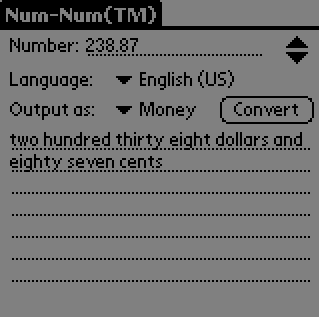
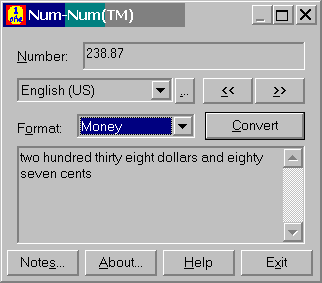

Download them from here. In all cases, download by first saving the file to a folder on your hard drive, then run the install program (Windows) or unzipping the file (Palm).
Palm OS
Windows 9x/NT4.0/2000/XP
Mac OS X (10.4 or greater)
Windows CE (HPC, Palm-Sized PC, Pocket PC, HPC/Pro)
Usage Terms and Conditions
Num-NumTM Copyright © 2000-2007 by Mohan Embar All Rights Reserved.
Num-NumTM is written as a personal project by Mohan Embar. He has made this program available for download on this website under the following terms and conditions. Usage of this program indicates your acceptance of the following license conditions. If you do not agree with these terms, you may not use this program.
This program is PropagandaWare. If you continue using this program seven days after the first use, you agree to visit the following websites:
- http://www.thisiscool.com/mohan/ardiscus.html
- http://www.tryveg.com/cfi/toc/
- http://www.peta.org/
- http://www.vegfamcharity.org.uk/
- http://www.veganpeace.com/
- http://www.earthsave.org/lifestyle/chocolate.htm
- http://www.earthsave.org/health/what_about_dairy.htm
- http://www.earthsave.org/health/what_about_chicken.htm
- http://www.animalsong.org/
- http://www.mcspotlight.org/
You are exempt from this agreement if:
- you do not have Internet access
- you are using this program to create or modify rules
Permission is granted to any individual or institution to copy or redistribute this software provided that:
- it is not altered in any way
- it is not sold for profit
- this copyright notice is displayed
- if made available for download on a non-FTP web page, that a link be made to http://www.num-num.com/ whenever possible
This program comes with no warranties, either express or implied. In no event will the copyright holder be liable for any damages resulting from the use of this software.
Submitted Rules
This section contains all submitted rules and their authors. Click on the language name to display the rules for this language. Right-click and choose Save Target As... (or Save Link As...) to save this to a file on your machine. Consult your platform-specific instructions for details on how to add this language.
If you're interested in creating new rules or fixing these rules, consult the developer's page.
| Language | Author(s) | Comments |
|---|---|---|
| Deutsch | Mohan Embar | comes preinstalled |
| English | Mohan Embar | comes preinstalled |
| español | Mohan Embar | comes preinstalled |
| français | Mohan Embar | comes preinstalled |
| italiano | Mohan Embar | comes preinstalled |
| Nederlands | Mohan Embar | comes preinstalled |
| Suisse romand | Olivier Lacour | Swiss French (Geneva) |